Playground: interaction and motion experiments by Mahin Jahan
Side quests I make to learn something new, or just for the fun of it .
A product site, motion studies, two worlds in VR, game UI, and one extension that shipped.
Bloomi’s site, scrolled from top to bottomThe product site I designed for Bloomi, Jobi’s sister app: scroll-driven transitions build a month of habits from a single square, then open it into Chrome’s side panel.Bloomi • Website on jobi.lifeDiscord’s reply, rebuilt for its motionThe small motion in Discord’s reply: the text field’s corners morph, and the reply button spins in and changes colour.Discord reply • Motion studyA habit tracker, redesigned in 24 hoursMy final design from Bending Spoons’ design competition, where the brief was to redesign Productive in a day: challenges you take on with a friend, a heatmap of every day you showed up, and a sprout that rates how hard the day was.Productive • Bending Spoons competition
A Sword Art Online scene, rebuilt in VRThe anime’s interface, its sound cues and its world, put together so the moment feels the way it does on screen.Sword Art Online • VRTrafalgar Square at night, with nobody else in itA VR mystery thriller made in a group for a university VR module: an immersive tour of Trafalgar Square with nobody else around.Lost in Trafalgar • VR gameTerms of Service, read for youA Chrome extension that summarises Terms of Service the moment one appears, explains the confusing clauses, and checks contracts and subscriptions for hidden changes.Printl • Shipped extension
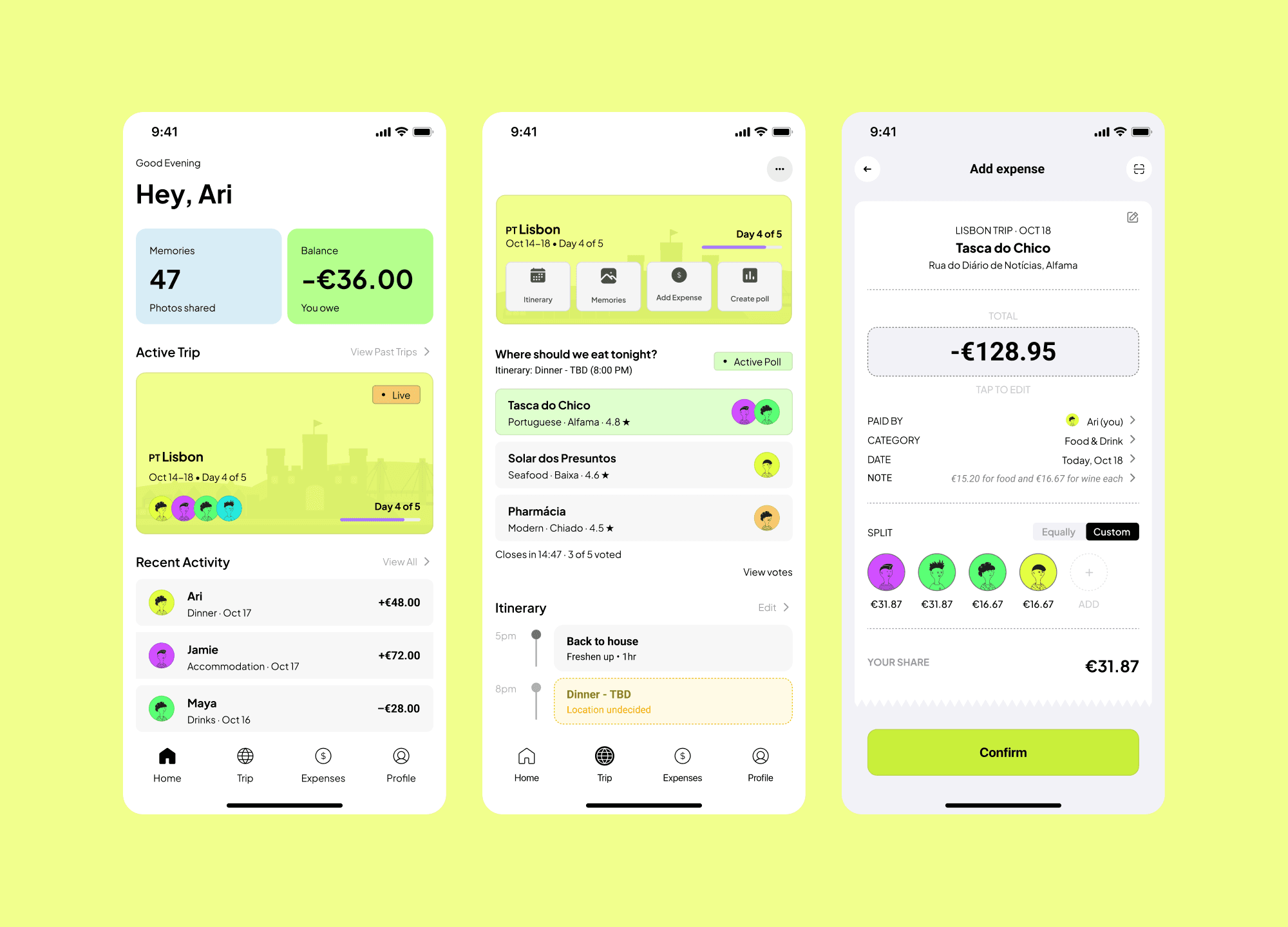
Group trips without the spreadsheetA travel companion that merges group expenses with shared photos, so one app carries what a scattered set of tools did.TripUp • App concept
The Quest Up advert, before it movedThe storyboard and character sheet behind Quest Up’s anime advert: she opens the app, the screen bursts into a neon city, and she runs it.Quest Up • Advert storyboardA battle pass drawn like a hero’s notebookDeku’s Notebook as game UI: comic panels, halftones and bold type, with progression, purchases and rewards kept legible on a controller.Deku’s Notebook • Game UI
About Mahin Jahan
I’m a designer, a cook and a League player, hooked on progress you can see .
In my second year reading economics I was running a startup, Quest Up, and wanted to design it properly. A summer at BrainStation gave me the same kick the startup did: you make something, people use it, and the progress is right there in front of you. A Master’s in Human-Computer Interaction added the theory, and an internship at Pactto put my first feature into a public beta.
Off the clock I cook, play League of Legends and run (next race: London Winter 10K). Cooking is the one that maps onto the work: UI is the plating and UX is the food. One attracts, the other keeps them.
Collaboration that doesn't end when the call does.
Pactto is a canvas-based workspace where video teams meet, review and produce together. As a product design intern on a team of five designers I worked on all of it, from research to the final designs; Pin Comments and Smart Voice were my ideas.
Pactto puts the whole video production workflow on one canvas. The problem we took on was the gap between live and async work: feedback given on a call was lost once it ended. We anchored feedback to the asset itself, so it outlives the meeting.
Success Metrics
From usability testing with people on the private-beta waitlist: the video teams Pactto is built for.
~65%Less Tool SwitchingFeedback, tasks and the conversation stayed in one place instead of across several apps
~40%Faster ReviewsA round of review took less time with feedback pinned to the work itself
P0Shipped in the Open BetaThe commenting suite, Pin Comments included, was the beta’s top priority
Context
Too Many Tools
The video editing workflow is fragmented. Teams juggle separate tools for feedback, tasks and communication, and lose context with every switch.
Enter Pactto: One Room, Full Story
Pactto brings live calls and the editing workflow into one canvas-based “Room”, where feedback, decisions and production happen in the same place.
Research
Validating the Friction
We synthesised the research into an affinity map. It surfaced several friction points, and we chose one key insight to tackle first.
Deep Dive: Is Pactto a conferencing or collaboration tool?
When I first joined, Pactto faced a core positioning dilemma: compete as a conferencing app or a collaboration workspace.
I initially advocated for the conferencing route based on competitive defensibility. Legacy tools like Zoom and Teams would struggle to copy our unique Canvas UI without completely breaking their users' established cognitive models. In contrast, competing as a collaboration tool meant facing off against giants like Miro and FigJam, who already owned the canvas format and simply needed to add a video call feature to close the gap.
However, after realigning with the founders, we committed to the collaboration model. The business strategy was to scale vertically (targeting specific creative workflows) rather than horizontally (building a generic meeting tool for everyone). Returning to our primary goal of reducing tool-switching, we realized Pactto couldn't just be a temporary meeting link. It needed to be the persistent, singular home where the entire end-to-end workflow actually happens.
The Problem We Focused On
On the map, one insight stood out as the root cause of the fragmentation.
Key insight: the “Async Gap”
42.9% of users were blocked by unclear feedback, and Pactto was purely synchronous. Miss the meeting and you miss the context. We needed a Contextual Library so feedback persists on the asset, not just in the moment.
User Insights: Beyond the Async Gap
The async gap came first, but the research turned up three more insights that shaped the final design.
Cognitive Load of the Canvas: Video editors found the infinite canvas “alien” because they are accustomed to working inside linear timelines. This paradigm shift meant we needed to provide structured starting spaces to reduce initial friction.
The Need for Presentation Control: Presenters lost their flow when audience members jumped ahead or crowded the screen with cursors. Users explicitly noted they needed to control the pace to prevent visual chaos and maintain sharp, focused feedback.
AI for Admin, Not Art: Creatives firmly stated they want AI to handle administrative tasks rather than generative creative work. They highly valued tools that quietly turn conversations into itemized notes so they can stay in their flow state.
How might we
preserve feedback context in async video reviews so decisions stay clear, traceable, and tied to the work?
This question shaped the core feature: one canvas where feedback stays attached to the work.
Design process
Build, Test, Review, Every Week
We built, tested and updated prototypes on a weekly cycle, so every week ended in a round of validation.
Accelerating Prototyping with AI
Our stakeholder cycle required us to present functional features every week. Static mocks couldn't capture the complexity of video scrubbing or interaction timing, so we inverted the traditional workflow.
Instead of perfecting pixels first, we used Google AI Studio to “vibe code” functional prototypes.
Strategy
We built interactive code prototypes to validate interaction feel (like drag-to-comment) in weekly reviews.
Benefit
This let us iterate on complex mechanics in real-time, then codify visual specs in Figma.
Handoff
Engineers received a dual handoff: Code Prototype for behavior, Figma Design System for visuals.
Solution
Designing for Expressive Feedback
Defining the MVP Together
We ran group reviews in Google Sheets, weighing Priority against Effort to decide what was critical for the Open Beta and what could wait.
Prioritizing Async Collaboration
With the live tools already stable, the Commenting Suite became our P0: a feedback layer that persists alongside the real-time workflow.
Rejected Idea: The Collapsible Sidebar Proposal
The original top-anchored webcams ate a third of the screen and stole focus from the canvas. They also failed to scale: at twenty people the strip collapsed over the presentation.
I designed a collapsible sidebar for the feeds, like Google Meet, letting users hide the webcams entirely and focus on the work.
Stakeholders rejected it. Human connection was meant to be an unavoidable pillar of Pactto, and hiding the feeds undermined that.
So the cameras scale instead of hiding. The more people join, the smaller each feed becomes, so the container never grows, so the room stays human without costing canvas.
Foundations: Contextual Commenting
We designed three ways to comment, one for each kind of creative feedback. Pin Comments was the one I proposed.
My idea
Pin Comments (Spatial)
Anchors feedback to a precise coordinate on the frame. Click exactly where the issue is, and there is no ambiguity about which pixel needs attention.
Drag Comments (Area)
Draws a box around a region to define the scope of a change, without having to describe where it is.
Timeline Comments (Temporal)
Spans a duration rather than a single frame, so pacing, audio sync and action can be critiqued by marking start and end on the scrubber.
Design constraint: unified interaction
Distinct commenting tools for distinct needs, but reached through a Single Interaction Point, so the choice never costs the user attention.
Design Decision: The “Comment vs. Task” Friction
The crossroads: generic comments like Figma’s, or strict accountability. For video editors, generic comments meant no way to tell a casual “maybe” from a critical “must-do” in a flood of feedback.
Unified Activity Panel
A lightweight “Task” toggle inside the comment box. Chat and work coexist in one stream, and the feed filters down to a prioritised checklist of action items.
Design decision trade-off
The toggle adds a moment of friction: is this a task? We accepted that cost when writing a comment to remove a far larger one at review, trading a minimal UI for clear accountability.
Smart Voice: AI Inside the Flow
Of the AI tools we explored, Smart Voice is the one I brought to the team. I wanted AI built into the review itself, not a separate “AI island” that feels like a gimmick, so it lives in the comment box people are already using and settles the conflict between speed and documentation.
My idea
Smart Voice
Transcribes spoken feedback and anchors it to the timeline. Reviewers give nuanced context without typing; editors get precise text synced to the exact moment.
Design constraint: integrated AI
Built in, never bolted on. Assistance appears where the person is already working, not in another tab.
Developer handoff
The Handoff: From Prototype to Production
The System
We grew Pactto’s existing UI into a modular design system (type, colour, components) so every screen stayed consistent.
The Logic
We mapped every user flow to its vibe-coded prototype, so engineers had a reference for exact animation behaviour.
The Priority
We tagged every feature with an MVP priority, separating open-beta must-haves from fast-follows to keep scope in check.
Takeaways
Key Takeaway
An Extra Should Never Block the Core
We let a P1 feature, AI meeting summaries, hold up the core commenting system for two weeks, and it was cut from the open beta anyway. An enhancement should never hold the core loop hostage.
Ship the Core First, the Extras After
Next time I would release the core and the enhancements separately, so the main workflow is validated straight away instead of waiting on a secondary feature.
Unfortunately I couldn’t make it in person, so please enjoy these completely un-edited photographs of me with the team.
A companion for the job hunt, not an autopilot for it.
Jobi is a browser-extension companion for the job search, built around how people feel while applying rather than how many applications they send. I designed it with two other designers and built it myself, from the first screen to a private beta.
Most job-search tools try to bring you more postings or make each application faster. Jobi is built for the other half of the search: keeping up the habit of applying every day, and bouncing back after a rejection. It is a companion in your corner, running as a browser side-panel alongside the search.
Success Metrics
From the private beta. The numbers below are about behaviour and speed rather than scale, which is what an early build can honestly show.
2–4 minTo a First ResultFrom finishing onboarding to a job analysis, a tailored CV or a cover letter in hand
57%Changed the Default CompanionMost looked at all four before deciding, so the choice earns its place at the start rather than buried in settings
39%Of Letters RewrittenThe check for machine-sounding wording caught them and rewrote them before they were sent
Secondary Research
The Search Damages Mental Health
We started with published surveys. They show that the job search harms most of the people going through it, not a small minority. What they do not show is why. That is what our interviews were for.
The surveys showed the damage but not its causes, so we built the interview guide around three questions a survey cannot answer.
01 Methods
How do people actually track applications once the volume climbs?
02 Friction
Which parts of applying cost the most time, and which cost the most energy?
03 Emotion
What makes someone lose momentum, and what gets them started again?
Interviews & Competitive Analysis
The Tools Organise the Work. None of Them Question It.
We interviewed five job seekers mid-search, applying to anywhere from four roles a week to thirty, then audited the two tools they kept mentioning. Teal and Simplify both autofill forms, track statuses and help you apply to more jobs. Not one of our interviewees said that applying to more jobs was their problem.
Analysis
What the Interviews Kept Saying
We sorted every interview quote into an affinity map. The clusters that came out were all about emotional fatigue, not about a missing feature.
The three insights a product could answer. The fourth cluster, silence from employers, is outside any product's control: no feature makes a company reply.
Key insight: the volume trap
Indeed's own data shows the highest-volume applicants are 39% less likely to get a positive response. Every tool in the category is built to increase volume, which is the very thing that lowers people's odds.
How might we
reduce the emotional cost of the job search, without taking the search out of the user's hands?
This question shaped everything that follows.
Branding
Growth Was the Only Honest Promise
Every competitor's brand promises the outcome: the job. That is the one thing
no product controls. What we could promise honestly is growth, because skills
and habits build long before anyone says yes. So the brand is designed to calm
you down, not to keep you hooked.
The metaphor lives in the system, not the logo
A seed with two leaves, and a palette named to match: Seed Black,
Sprout Grey, Bloom Pink. The metaphor ends up in every screen, not just
the mark.
Supportive, never cheerful
“You apply. We got your back” is the promise;
“Keep growing” is the line. Both had to hold after a
rejection, not just after a win.
Calm Is the Feature, Not the Decoration
A face is the quickest way to give a mascot personality. But a mouth is also
what makes a face look like it is judging you. People mid-search are already
anxious about being assessed, and Jobi reads their CVs, cover letters and
interview answers all day. So the mascot has no mouth in any pose: it cannot
frown, smirk or look disappointed. Everything it expresses comes through its
eyes and its posture, and nothing it does reads as a verdict.
Jobi
Miss Jobi
Sir Jobi
Lady Jobi
The rig the app ships, in its four companions. Each arrives, waves and settles; the eyes and the tilt of the body carry every pose.
The trade-off
Without a mouth there is far less expressive range, so the warmth has to come from motion, which is harder to get right and slower to build. Worth it: a companion you feel judged by is not a companion.
Solution
One Companion, End to End
Jobi runs as a browser side-panel next to the job search. You choose which roles to go for; Jobi handles everything around them: the research, the documents, the tracking and the practice. Each of the three insights has a feature behind it. One more thing the interviews asked for, autofill, was built and then removed; the reason is further down.
Break down a job description before you apply.
78
Match score
Linear
Four years on data-dense product surfaces is the core of this posting, and your shipped work shows it.
The gap is scale: they want someone who has run a system across several teams.
Speak your answers straight into the application form.
Why do you want this role?Four years on data-denseproduct surfaces, at scale.
Practice interviews by speaking out loud.
Lauren
Keep a streak going, one application at a time.
Deep Dive: Shipping fewer features than either competitor
The obvious way to look credible next to two funded products was to match their feature count. Jobi went the other way: one chat, one tracker, one practice room. Anything that did not answer a research finding was cut before it was built.
Every feature is one tap from the home screen. There are no sub-menus.
The trade-off
Jobi loses any feature-by-feature comparison, and power users who want dashboards and bulk tooling are better served elsewhere. Accepted, because the person we designed for is not shopping for features. They are tired.
The Chat: Judgement on Tap
Answers the third insight: the research you have to do before you can write a word.
The home screen is a chat. Paste a job posting and Jobi tells you whether it is worth applying for, tailors your CV and cover letter, and researches the company, so you stop juggling tabs.
Tailor My CV
Jobi reads your CV against the job description and opens a separate tab with a CV editor. Pick a template and your CV appears adjusted to the role, with every change highlighted. Hover a highlight to see why it was made, or select any line and tell Jobi how you want it changed. Download the PDF when it is right. Jobi does the work; you make the final call.
Write a Cover Letter
Jobi drafts the letter from your CV and the job description and opens it in the same editor, in its own tab. Pick a template, see the lines written for this role highlighted, hover any of them for the reason, and rewrite any sentence by selecting it and telling Jobi what you would rather say. Download the PDF when it sounds like you.
Deep Dive: Why autofill was built, then cut
Autofill was in the first build. To be useful it has to fill the details that repeat on every form: phone, email, address, place of birth. Storing those means holding sensitive personal data we would be liable for. We cut it entirely. Without those fields, what was left did not justify installing an extension.
The trade-off
The most repetitive part of applying stays manual, and one research finding is left deliberately unanswered. A smaller tool is better than holding data we cannot promise to protect.
Interview Practice
Answers the silence from employers: when replies are rare, the few interviews you get have to count.
The Tracker
Answers the first insight: statuses logged by hand go stale.
Key decision
Standard trackers weight every status equally in traffic-light colours, so
a search that accumulates rejections becomes a wall of anxiety. Statuses
split into Active and Closed instead: rejection is real but tucked away, and
colour survives only in a small dot, at the cost of closed applications being
harder to scan.
Momentum
Answers the second insight: a rejection can stop the search for a week.
Three things in the tracker are there to get you going again. Reminders bring a
role back before it goes quiet. Rejections move to Closed, so the pipeline you
look at every day is the live one. And the streak counts the days you showed up:
it never warns you that you are about to lose it, and after a rejection it goes
quiet instead of loud.
Design Process
Designed Together, Built Solo, Debugged With an Engineer
The three designers, me included, ran research, ideation and design together in Figma. I built the MVP alone and released it as a private beta, then worked with a software engineer to debug it.
I am a designer, not an engineer, so I set the build up as a system before any of it was written. Claude Code held every interview, map and decision as one shared context, and each agent had a single job, which kept the build tied to the research.
Takeaways
Key Takeaway
Building It Myself Was Fast, and Unchecked
Building and shipping alone up to the beta meant a decision could be in the product the same day it was made. It also meant nobody else read the code until an engineer joined to debug it. The panel reached 13,700 lines in one file before I noticed, and untangling it was work I had created by moving faster than I was reviewing.
The Privacy Call Was Right, and It Came Too Late
Autofill was built before we asked what storing phone numbers and addresses would oblige us to protect. Cutting it was the right call, but it came after the build instead of before it. Research told us re-typing was a real problem. It could not tell us we would need a different answer to it.
Essential Context is a concept for Nothing OS that I designed alone in 48 hours: hold a button, say what you’re doing, and the phone builds a temporary home screen with only the tools for that moment.
Team
1 Product Designer (Me)
Concept · 48 hours
Too long didn’t read
The Challenge: One evening out can mean jumping between Uber, Messages and Wallet, each found by digging through an app grid. That hunting is friction the moment doesn’t need.
The Solution:Hold the essential button and say the situation. Nothing OS builds a temporary home screen for it, then puts the normal one back when it’s over.
Scenario
A Home Screen for the Moment You’re In
Heading out for the evening, you don’t want to dig through app drawers for a ride and the booking. Essential Context builds a temporary screen with only those tools, so your attention stays on the evening.
Mapping the Journey
Holding the essential button on the lock screen opens the setup, with a sweep of light. Choosing “Date Night” drops you into the curated screen, and the Glyphs show the time left before it expires. A yellow pill stays in the top right, so you can change the settings, or leave and get the normal home screen back.
Purpose
Built From Nothing’s Own Features
Nothing’s pitch is intentional phone use: less time in apps, more time in the moment. Essential Context gets there by drawing on Nothing’s Essential features rather than adding another app.
In the Date Night example, each one does part of the work:
Together they turn a grid of icons into a screen built for the moment, and the more Essential features someone uses, the better that screen fits.
System
Hardware and Software Together
To feel native to a Nothing phone, the hardware has a part to play too:
01
The Trigger
Holding the essential button pulls up the Essential Context setup.
02
The Glyph Matrix
While a context is on, the back of the phone shows a simple icon (a cocktail glass for Date Night), so the people around you can see you’re focused.
03
The Glyph Lights
The Glyph lights count down the context’s auto-expire timer, and only light up for your pinned priority contacts.
Design decisions
Fewer Taps, More Presence
Two choices kept the interface as light as the idea:
Decision 01
Smart Chips over Menus
Settings like “Smart App Filter” and “Priority Contact” are one-tap chips rather than menus, so setting up a context takes a few taps.
Decision 02
The Status Pill
A small pill stays in the top right while a context is on. Tapping it opens Edit and Exit, one thumb’s reach away instead of buried in Android settings.
Testing
What I’d Test First
This was a 48-hour concept with no user testing, so these are the assumptions I would check before anything else:
Is Saying It Faster?
Whether naming the moment, by voice or a chip, is quicker than opening the three apps yourself.
Does a Timer Fit Real Plans?
Whether auto-expire suits evenings that run late or end early, or should end on a signal like leaving the venue.
How Does the Room Read It?
Whether the people nearby read the icon on the back as “focused”, or as the phone broadcasting.
Future
Where It Could Go Next
Today a context starts by hand. Longer term, the OS could do it for you:
Predictive Contexts
Build the screen from your routine, without being asked.
Fallbacks That Learn
When a context misses a tool, Essential Search fills the gap, and the next context includes it.
Tactile Switching
Switch between saved contexts with a tap or swipe on the back, without waking the screen.
Deeper Customisation
Context-specific widget themes and richer integrations as Essential Apps grow.
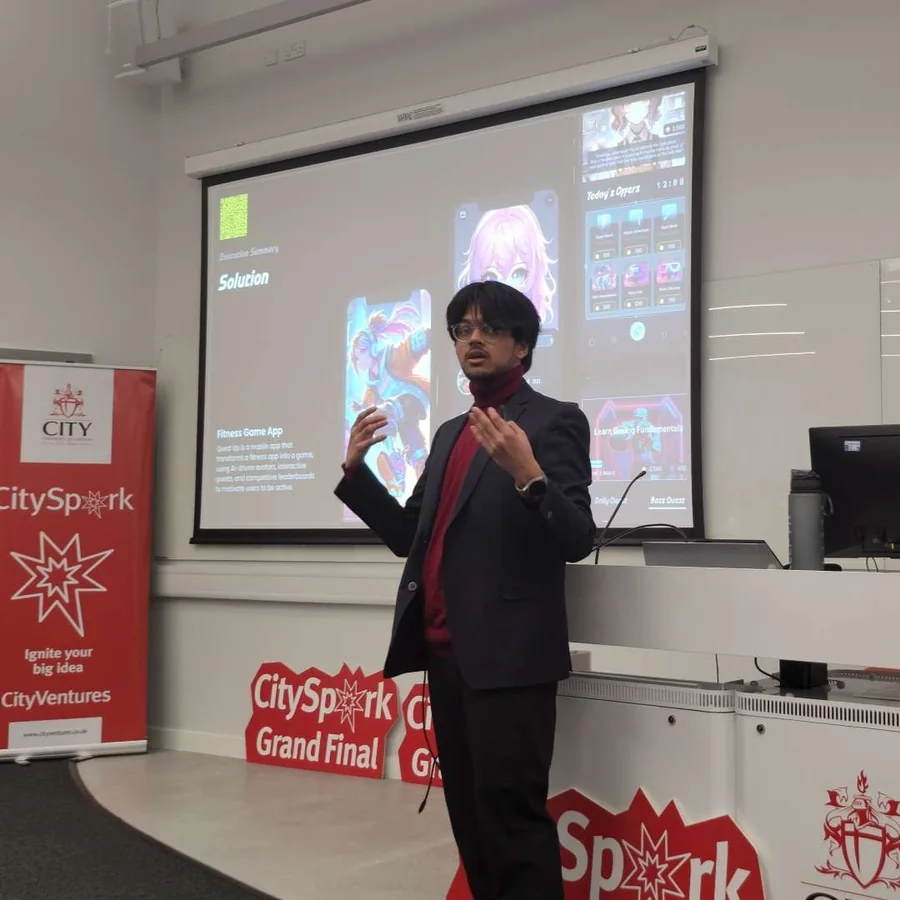
Quest Up is a fitness companion for gamers who sit for hours, built on the quest loop they already play. As founder and sole designer I took it from research to a high-fidelity concept, and it won the CitySpark startup competition and a £3K grant.
Team
1 Founder & Product Designer (Me)
2023–24 · Startup
Too long didn’t read
Gamers want to be healthier, but the motivation rarely becomes a habit: next to the instant rewards of a game, fitness feels like a chore. Quest Up borrows the game’s own loop, short, structured quests with instant rewards, to lower the barrier for sedentary players. It is a design concept: it won the CitySpark startup competition before an MVP was built.
Context
Gaming Is Rewarding by Design, Movement Is Not
Games hold attention with clear goals, instant feedback and visible progress. Fitness feels effortful, unstructured and slow to reward. So even gamers who want healthier habits default to long sessions sitting down: movement doesn’t fit the way they already spend their time.
Why This Is a Problem
Long inactive sessions bring low energy, weight gain, back and eye strain, and worse health over time. Because fitness feels intimidating and easy to put off, consistency breaks quickly, even when the motivation is there.
Solution Overview
Quest Up lowers the barrier by borrowing mechanics gamers already understand. Movement becomes short, structured quests with clear progression and rewards, so exercise feels familiar, achievable and easy to start inside a gaming routine.
Expected impact
Making movement feel game-like should cut the friction at the moment of deciding, and encourage small, repeatable actions: healthier habits without giving up the games.
Problem
Motivation Isn’t the Problem. The Format Is.
Research with 15+ gamers on Discord and at conventions revealed a paradox: gamers want to be healthy, but fitness lacks the immediate feedback loops of gaming.
Problem: Long Hours Sitting
“On average, I spend around 3 to 4 hours a day gaming.”
Pain Point: Exercise Feels Like a Chore
“I want to be more active, but I don’t feel motivated to exercise.”
Opportunity: Open to Gamified Fitness
“If I can see my daily progress visually, I might be able to stick with it.”
Key insight
Fitness feels “unstructured and slow,” whereas games are “structured and rewarding.” We don’t need to change the gamer; we need to change the interface of fitness to match their mental model.
Target user
Who I Designed For
Primary Users
Gamers who want to be more active, but struggle to stay consistent.
Secondary Users
People who find fitness intimidating and need a guided, rewarding structure.
Meet Adam, a 21-year-old computer science student who loves gaming, but is starting to feel the health impact of long sessions. He wants healthier habits, but struggles to stay consistent without giving up what he enjoys.
Adam’s Journey
I mapped out the typical gamer’s lifecycle to identify the exact friction points. Adam’s goal: to exercise without breaking his flow state or feeling like he is “going to the gym.”
The focus became lowering the barrier to fitness by making movement feel familiar, rewarding, and easy to start within a gaming routine.
How might we
motivate gamers to engage in physical activity to improve their long-term health?
Solution
Designing the Core Loop: Move, Reward, Upgrade
Decision 01
The “Quest” Metaphor
I reframed vague goals (“exercise more”) into binary quests (“do 10 squats”). This reduces cognitive load and decision fatigue.
Decision 02
The Retention Layer
Streaks and leaderboards guard against drop-off, but I made avatar progression the lead reward: levelling up a character is the RPG (role-playing game) trope this audience already plays for.
The layer reinforces the loop with visible progress (stats and streaks), social motivation (leaderboards) and self-expression (the shop and customisation), without adding steps to the core action.
Iteration
The Safety Iteration: Designing Out the “Grind”
Mapping the reward loop surfaced a risk: a motivated player could “grind” exercises back to back just to earn currency, and risk injury. Games reward exactly that behaviour; a fitness app can’t.
The Fix: An Energy System
I added an energy system, a common gaming mechanic: each quest costs energy, and energy refills daily. It paces activity and guards against burnout and injury, and, as in games, a cap should leave players wanting to come back tomorrow.
Design decision trade-off
A cap can feel restrictive, so it is framed as recovery and streak protection rather than a limit. The aim is safer pacing and habits that last.
Outcome & impact
A Winning Idea
The concept won the CitySpark Grand Final and a place on the accelerator, before a line of the app was built.
1stCitySpark WinnerStartup competition grand final
£3KEquity-Free GrantAwarded alongside acceptance onto the accelerator
15+Gamers in the ResearchInterviewed on Discord and at conventions
What an MVP Would Test
The progression and the energy system are design decisions, not tested results: you can’t usability-test a workout habit with a prototype. A first build for a cohort of 50 players would check three things:
Does the Avatar Hold Them?
Whether levelling up a character keeps people coming back better than streaks and leaderboards alone.
Recovery or Limit?
Whether the energy cap reads as rest and streak protection, or as the app stopping them.
Do Quests Match Real Effort?
Whether quests logged by phone or watch line up with the exercise people actually did.